
A dated, numbered baseline
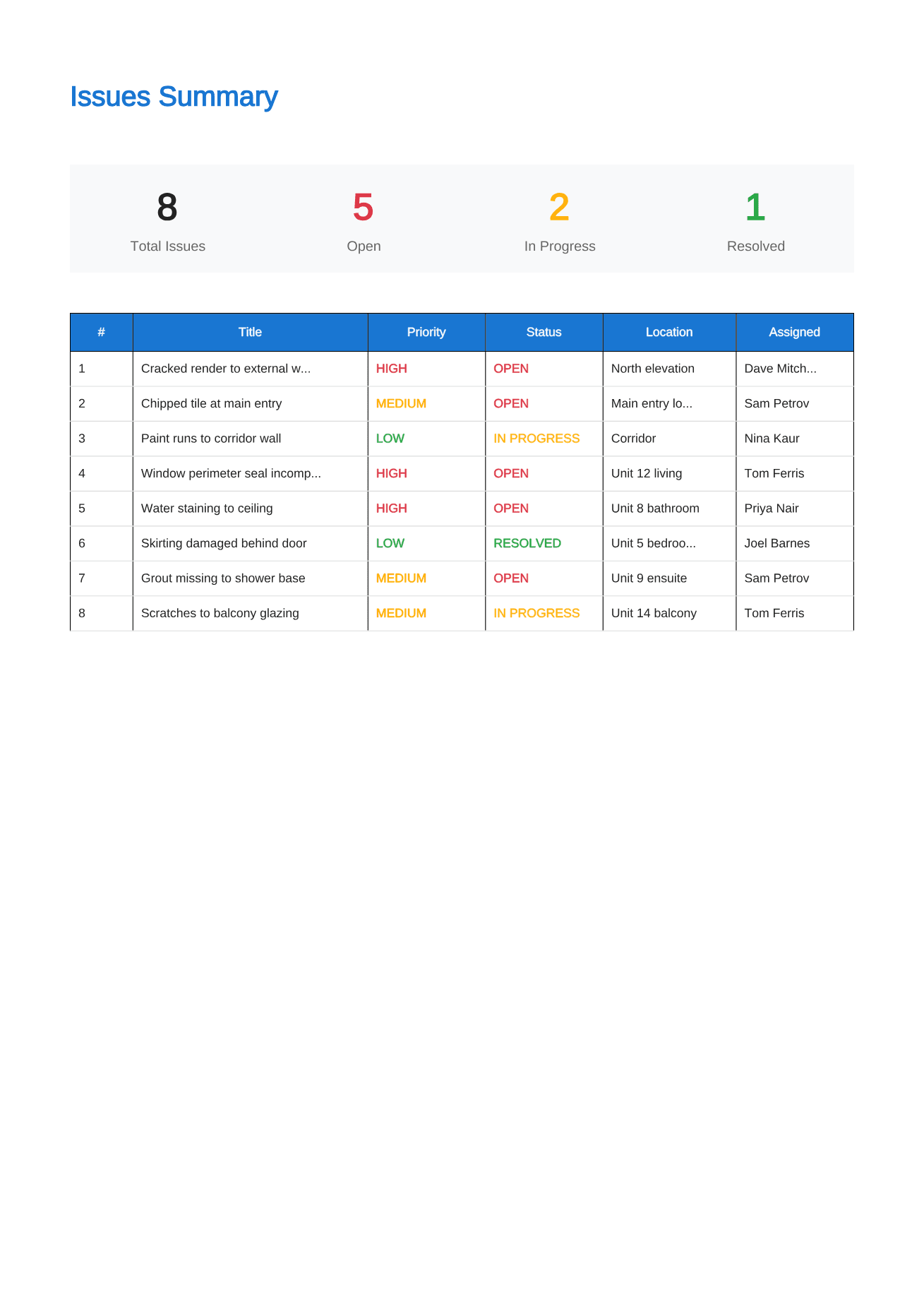
Every defect gets a permanent number, a date and its own page, so re-inspections compare like with like instead of arguing about what was on the original list.
Practical completion, pre-handover and end of defects period walks all produce the same thing: a defect list that decides who fixes what. This app produces it on the day, offline, with your name on the cover.
For builders, site supervisors, superintendents, building inspectors and owners at handover. Android 8.0 and above. Free for one project, no account required.
The handover inspection sets the baseline for everything that follows: what the builder still owes, what the owner accepted, and what the defects liability period has to cover. A list written on paper and typed up a week later is exactly the kind of record that gets contested.
Site Audit records the defect at the moment it is found, with the photographs, location, trade and priority attached to it. The PDF that leaves the walk is dated, numbered and consistent, so the same record is available to everyone who has to act on it.
Every defect gets a permanent number, a date and its own page, so re-inspections compare like with like instead of arguing about what was on the original list.
Assign items to the responsible contractor and export a filtered PDF for each one, so the tiler is not scrolling past forty painting items.
Locating and detail photographs with captions, stored on your phone and backed up to a single file, still readable at the end of year one or year two.
Step 1
Create the project with the property, client and inspection date, and add your business details once so every report carries them.
Step 2
Record each defect by area and floor, with as many photographs as it needs, a priority, and the trade responsible.
Step 3
Generate the PDF before you leave, then update statuses on the re-inspection walk and issue the closed-out version.
The defect list attached to the certificate is the one that decides what is outstanding. Number it, date it and keep it.
Owners and their inspectors record what the builder must rectify before keys are released, with photographs the builder cannot dispute.
Re-inspect against the original list, add anything that has appeared since, and close the record with resolved items still visible.
New buildings rarely have connectivity on inspection day. Capture, edit and PDF generation all run on the phone.
Straight answers about scope, storage and the reporting workflow.
Both use it the same way. A builder or superintendent issues the handover defect list to trades; an owner or their inspector issues it to the builder. The report is the same structure either way.
Yes. Every defect keeps its number and photographs. On the re-inspection, change the status to resolved or leave it open, add resolution notes, and generate a new dated PDF.
No. The certificate is issued under your contract by whoever the contract names. The app produces the defect list and the evidence that usually accompanies it.
Record defensible evidence on site and turn it into a clear, branded defect report before the details get lost.
See the workflowGive every closeout item a location, owner and clear finish line, then send each contractor only the work that is theirs.
See the workflowTurn observed conditions into a consistent, branded field report without transferring notes and photos after the inspection.
See the workflowUse a real four-part report example to structure project details, the issue summary, individual findings and photographic evidence.
See the workflow